Funny but completely true ...
Showing posts with label Computer Science. Show all posts
Showing posts with label Computer Science. Show all posts
Sunday, August 31, 2008

Wednesday, March 14, 2007
Open - A wonderful word ...
I really enjoy the adjective open. When applied to computer science topics is something that only offers advantages.
I'm not going to describe here the good things we have in open source solutions, and how incredible to visit sourceforge is in order to get almost everything you need but with an open license and with source code.
Recently, I'm enjoying with another application of the world open to lecturing. A fantastic example is the MIT. They have opened almost all the material they use in their courses, and believe me, they are worthwhile (go here). They have incredible lectures notes and even videos. I personally love the videos you can follow in subjects like Introduction to Algorithms. They are very useful and interesting.
Visit and enjoy the MIT OpenCourseWare and take the most of it !
I'm not going to describe here the good things we have in open source solutions, and how incredible to visit sourceforge is in order to get almost everything you need but with an open license and with source code.
Recently, I'm enjoying with another application of the world open to lecturing. A fantastic example is the MIT. They have opened almost all the material they use in their courses, and believe me, they are worthwhile (go here). They have incredible lectures notes and even videos. I personally love the videos you can follow in subjects like Introduction to Algorithms. They are very useful and interesting.
Visit and enjoy the MIT OpenCourseWare and take the most of it !
Wednesday, April 26, 2006
Free online programming books
A very common problem some programming students have is the access to good and free tutorials and books.
Check out this link:
195 Free Online Programming Books (from www.techtoolblog.com)
It's a fantastic list of programming books. All free. Some of them, believe me, very good !
Check out this link:
195 Free Online Programming Books (from www.techtoolblog.com)
It's a fantastic list of programming books. All free. Some of them, believe me, very good !
Tuesday, April 11, 2006
8 bit computers - a retrospective look
There was a time in which just one person was able to develop a game... using machine code, simple graphics, very good ideas, a lot of imagination, and many hours ...
There was a time without UML, Object-Oriented Programming, .Net, Java ... even without C ... It was the time of BASIC.
There was a time in which a tape recorder was something more than your only way to copy music... It was the only way we had to load and save programs ... It was the time of the beeerererrppereerpppeeeppeeep ... We were so familiar with such a sound that we were even able to guess if the sound corresponded to graphics or code ...
I'm referring to the beginning of the 80s. And I am lucky, I lived that moment.
I was 13 the very first time I saw a computer. Impressive. I decided to learn everything about computers. After one year learning what I could from magazines and books, I convinced my parents to buy my first computer. My idea was to buy a Sinclair Spectrum, but when we went to the shop, a Sony MSX was their suggestion. I didn't mind.
MSX was the first serious attempt to reach a standard for personal computers. Sony, Philips, Panasonic, Toshiba and other companies produced computers under this standard. It was a fantastic computer, with an important continuity (MSX-2, MSX-2 turbo R ...) but finally, it disappeared.
The original ROM included the BASIC programming language and, with the disk version of the machine, an operative system called MSX-DOS also appeared. Microsoft was behind that (the BASIC interpreter and the OS), and I have to say, they did a very good work. In fact, it was the best computer in that period (IMHO).
At that time, I was able to earn money (I was 14-18) developing games. In fact, there was no option. Without the Internet, without software to install... the only thing we were able to do with our computers was to learn programming. I have found a video that shows perfectly what I'm talking about:
(if you have bandwidth problems, watch all the video until the end, and press 'play' again; normally the cache is going to help you the second time)
What the video shows was true. The only I was able to do at the beginning was to buy those magazines with printed code inside, so you had to type it if you wanted something to do with your computer. Consequently, you were almost forced to learn programming. And after learning BASIC, machine code was the only chance to get more performance from those old computers.
Very different situation now. You can buy a computer and be able to do millions of things without even know what a program is. Is this current situation better than ours ?
There was a time without UML, Object-Oriented Programming, .Net, Java ... even without C ... It was the time of BASIC.
There was a time in which a tape recorder was something more than your only way to copy music... It was the only way we had to load and save programs ... It was the time of the beeerererrppereerpppeeeppeeep ... We were so familiar with such a sound that we were even able to guess if the sound corresponded to graphics or code ...
I'm referring to the beginning of the 80s. And I am lucky, I lived that moment.
I was 13 the very first time I saw a computer. Impressive. I decided to learn everything about computers. After one year learning what I could from magazines and books, I convinced my parents to buy my first computer. My idea was to buy a Sinclair Spectrum, but when we went to the shop, a Sony MSX was their suggestion. I didn't mind.
MSX was the first serious attempt to reach a standard for personal computers. Sony, Philips, Panasonic, Toshiba and other companies produced computers under this standard. It was a fantastic computer, with an important continuity (MSX-2, MSX-2 turbo R ...) but finally, it disappeared.
The original ROM included the BASIC programming language and, with the disk version of the machine, an operative system called MSX-DOS also appeared. Microsoft was behind that (the BASIC interpreter and the OS), and I have to say, they did a very good work. In fact, it was the best computer in that period (IMHO).
At that time, I was able to earn money (I was 14-18) developing games. In fact, there was no option. Without the Internet, without software to install... the only thing we were able to do with our computers was to learn programming. I have found a video that shows perfectly what I'm talking about:
(if you have bandwidth problems, watch all the video until the end, and press 'play' again; normally the cache is going to help you the second time)
What the video shows was true. The only I was able to do at the beginning was to buy those magazines with printed code inside, so you had to type it if you wanted something to do with your computer. Consequently, you were almost forced to learn programming. And after learning BASIC, machine code was the only chance to get more performance from those old computers.
Very different situation now. You can buy a computer and be able to do millions of things without even know what a program is. Is this current situation better than ours ?
Monday, March 06, 2006
Kid's Programming Language
Computer science is an essential subject in our children education. We are surrounded by computers and software, and because of that we have to be sure our children are prepared to work and interact with them.
But, is it possible to fully understand the basis of computer science without learning how to program ? It isn't, in my opinion.
Many, many times I have spent a lot of time trying to explain why a computer can or cannot do this or that ... and the problem, frequently, is the lack of knowledge about programming of my audience.
And it is generally a difficult process, since the current programming languages need strong skills from the very beginning.
Because of this complexity, a lot of alternative methods for learning how to program have appeared. I remember perfectly two of them.
The first attempt to make programming closer to people was logo (see more information here); a fantastic approach, based on Lisp, that uses a graphical turtle in order to see the results of our programs. In my opinion, it was (and it is) the best first approach to programming for kids.
I also remember Karel the Robot by Richard E. Pattis. In this case, we can control a robot which is able to get information about the environment and carry out actions like collecting things and moving around. Originally based on Pascal, now there are C based versions.
We have recently a new alternative: the Kid's Programming Language.
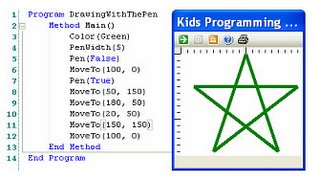
I have downloaded it, and it is basically a BASIC inspired language. It has some strong points: very easy interface, .Net based, automatic conversion to C# and Visual Basic, and a very comfortable graphic library. This graphic library is perhaps the most interesting feature, since with it we can see immediately very impressive results on screen.
It is well-known how boring 'console based' applications are, so to have the chance to produce very attractive graphics with just some lines of code it's something that guarantees success.
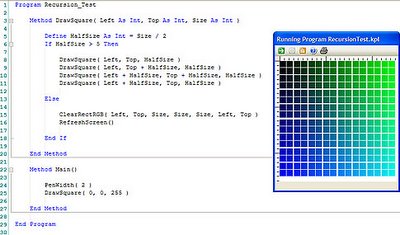
A future characteristic of this programming language is 3D graphics. With this new feature, this language could be also a very interesting first step in computer graphics introduction.

A very good introduction to mini-languages as a first step in learning how to program can be consulted in here.
But, is it possible to fully understand the basis of computer science without learning how to program ? It isn't, in my opinion.
Many, many times I have spent a lot of time trying to explain why a computer can or cannot do this or that ... and the problem, frequently, is the lack of knowledge about programming of my audience.
To learn programming is to understand what computers really understand.
And it is generally a difficult process, since the current programming languages need strong skills from the very beginning.
Because of this complexity, a lot of alternative methods for learning how to program have appeared. I remember perfectly two of them.
The first attempt to make programming closer to people was logo (see more information here); a fantastic approach, based on Lisp, that uses a graphical turtle in order to see the results of our programs. In my opinion, it was (and it is) the best first approach to programming for kids.
I also remember Karel the Robot by Richard E. Pattis. In this case, we can control a robot which is able to get information about the environment and carry out actions like collecting things and moving around. Originally based on Pascal, now there are C based versions.
We have recently a new alternative: the Kid's Programming Language.

I have downloaded it, and it is basically a BASIC inspired language. It has some strong points: very easy interface, .Net based, automatic conversion to C# and Visual Basic, and a very comfortable graphic library. This graphic library is perhaps the most interesting feature, since with it we can see immediately very impressive results on screen.
It is well-known how boring 'console based' applications are, so to have the chance to produce very attractive graphics with just some lines of code it's something that guarantees success.
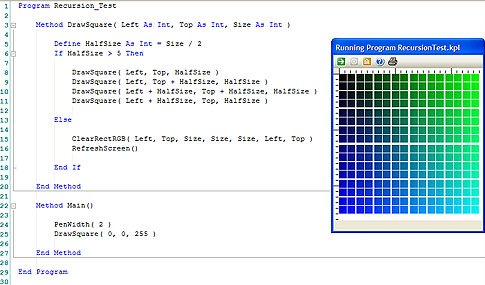
A future characteristic of this programming language is 3D graphics. With this new feature, this language could be also a very interesting first step in computer graphics introduction.

A very good introduction to mini-languages as a first step in learning how to program can be consulted in here.
Wednesday, February 22, 2006
An introduction to algorithm complexity analysis (I)
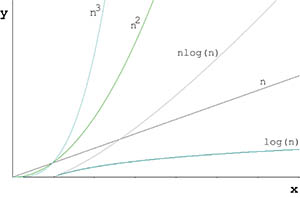
I cannot understand how many problems a lot of students have in learning the principles of algorithm complexity. So, finally, I have decided to prepare a short introduction and some tricks in order to help them.
In a previous post, I described some of the strong points in order to take into account the complexity analysis before coding. In this post I'm going to describe the four basic steps you must follow in order to study the complexity of an algorithm. In future posts, I will provide more details and examples for each step.
The first thing to take into account is the difference between efficiency and effectiveness. Effectiveness means that the algorithm carries out its function, it is correct. But when we talk about efficiency, we are looking for something else ... we want a correct algorithm and with the best performance.
Basic steps in complexity analysis of an algorithm
1. Select the computational resource you want to measure. Normally we have two options: time and memory. But other studies can be undertaken like, e.g., network traffic.
2. Look to the algorithm and pay attention to loops or recursion. Try to see the variables and conditions that makes the algorithm to work more or less. Sometimes is one variable, some times several ... This is going to be our size of input. Remember that with complexity analysis we are interested in getting a function that relates the size of input with the computational resource.
3. Once we have the size of input of the algorithm, try to see if there are different cases inside it. Normally we have to pay attention to the best, worst and average cases. What are 'cases' in this context ? Circumstances in which the algorithm can work differently. These cases NEVER depends on specific values (high or low) of the size of input. NEVER. To work with an array of 1 million components is not a 'worst case', is just a specific size of input which is going to have a resulted time or memory consumption.
To have different cases means that you are not able to provide just one function that relates the size of input with the computational resource. Probably, having for example a worst and best cases means that you are going to have two different algorithm behaviours. It is like having two algorithms inside the algorithm.
So, in the definition of the different cases you are not allowed to use the term 'size of input'. It has to be another thing. Look the loops or recursion, and try to see specific conditions that make the loop or recursion to finish before scheduled, before the end of the input range. Normally, there you have the clue of different cases. An example ? The linear search of an element inside an array. In such a case, if the element we want to look for is not inside the array, the algorithm, in order to provide a negative answer, has to go from the beginning to the end of the array. That's the worst case. But if the element we want to look for is in the first position of the array, then there is no iteration. We find the element immediately. That's the best case. Note that the 'size of input' of this algorithm, the number of elements of the array, is not part of the definition of best and worst cases.
Take into account that it is not only important to detect these cases, but to be able to define them, to describe in which circumstances we are in front of each case.
4. Now, for each of the cases our algorithm has, we have to count computational resource consumption. If we are studying temporal cost, for example, then we have to count instructions (or calls in a recursive algorithm). What we need is the function which relates the size of input with the computational resource. And in this function we are interested in its highest degree, i.e., we are interested in its asymptotic profile (how the algorithm works for high values of the size of input). At the end of this step, the important thing, rather than follow a correct notation, is to be able to show if the algorithm, and for each case, is LINEAR, QUADRATIC, EXPONENTIAL, LOGARITHMIC, etc.
These are the basic steps to follow in order to face the algorithm complexity analysis. In future posts, I will try to provide more details for each of these steps and some examples.
Saturday, February 18, 2006
Algorithm Complexity - don't forget it, please
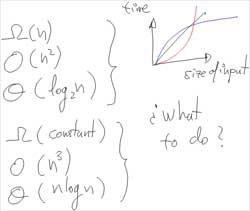
It is interesting to see how fast the software engineers are able to forget everything they have learnt about algorithm complexity. Personally, I spent a lot of time trying to show the importance of complexity to my students. Complexity is not only important as a way to evaluate and select the best algorithm for a specific problem, it is a way of thinking...
Complexity analysis is engineering methods applied to programming
With the new languages, new platforms, new and powerful computers... it is not as important, as it was, to think before coding. We code now the very first thing we think. We execute... and, if there's no error, that's all.
We have powerful libraries and frameworks. We don't need to implement from scratch a stack, queue, list, hash table, etc. We just use the implementation that comes with our environment, and sometimes we think that's enough. And of course, it isn't.
Do you know which is the complexity (temporal and spatial) of the different methods or functions of the library you are using ? Even in the case you know them, have you considered them in your proposed solution ? Sometimes you have several alternatives, did you consider them ?
Did you think about complexity the last time you implemented something ?
Computational resources ... With the new technologies perhaps we have to change the traditional approximation to complexity. Traditionally we speak about temporal and spatial cost as the main computational resources (memory and time). But... with a client/server approach, with distributed or grid systems... do we consider the network traffic ? It's just an example.
UML and all the new methodologies for analysis and design are forcing us to think before facing the coding stage. But, once we are coding, and I'm not talking only about Information Systems but any kind of application, do we apply what we have learnt about complexity ? Are we forgetting what makes us engineers when we code ?
Answer these questions:
- Is it worthwhile to sort an array of elements before undertaking some searches on it ?
- Is it better to use either a binary search tree or a hash table ?
- Is Quicksort your best choice whenever you want to sort out an array ?
- Is it better to get a/some table/s of a data base from the server to the client and afterwards carry out the queries ?
If you have answered these questions with anything different to a 'depends on', may be you have to review your information about complexity.
Wednesday, February 15, 2006
My first post
This is my first post of my new blog. I am sure that nobody is going to read this, but who knows...
When I decided to write a blog, my motivation was double. First of all, I think it is a good chance to improve my always poor english. Second, well... it is a good way to have a kind of register of my thoughts related to computer science, computer graphics and software development.
So, let's start with it.
When I decided to write a blog, my motivation was double. First of all, I think it is a good chance to improve my always poor english. Second, well... it is a good way to have a kind of register of my thoughts related to computer science, computer graphics and software development.
So, let's start with it.
Subscribe to:
Posts (Atom)